Account
Delete Your Account
You can delete your Realm account yourself, from inside the app, in under a minute. Deletion is permanent — once your account is removed, it cannot be recovered.
You need to be signed in
Deletion happens from inside your own account, so you have to be signed in on the device to confirm it. That's what proves the request is really coming from you — otherwise anyone who knew your name or email could delete your account.
You don't need a password. Realm signs you in with your phone number and a 6-digit code sent by SMS, so you can sign back in at any time to delete your account — even if you haven't opened the app in months.
Delete from inside the app
- Open Realm and sign in. If you're signed out, tap Enter the Realm, enter your phone number, and type the 6-digit code we text you.
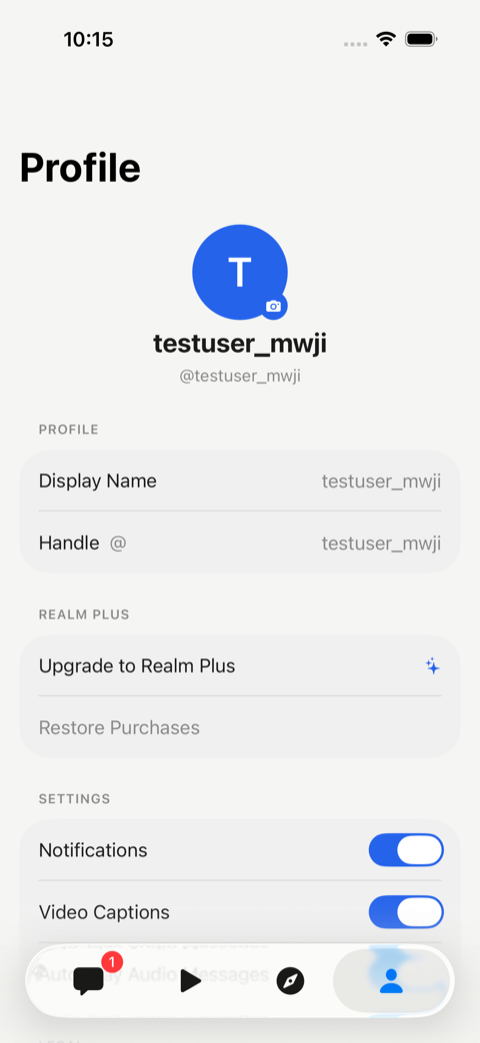
- Tap the Profile tab — the person icon at the far right of the bar along the bottom of the screen.
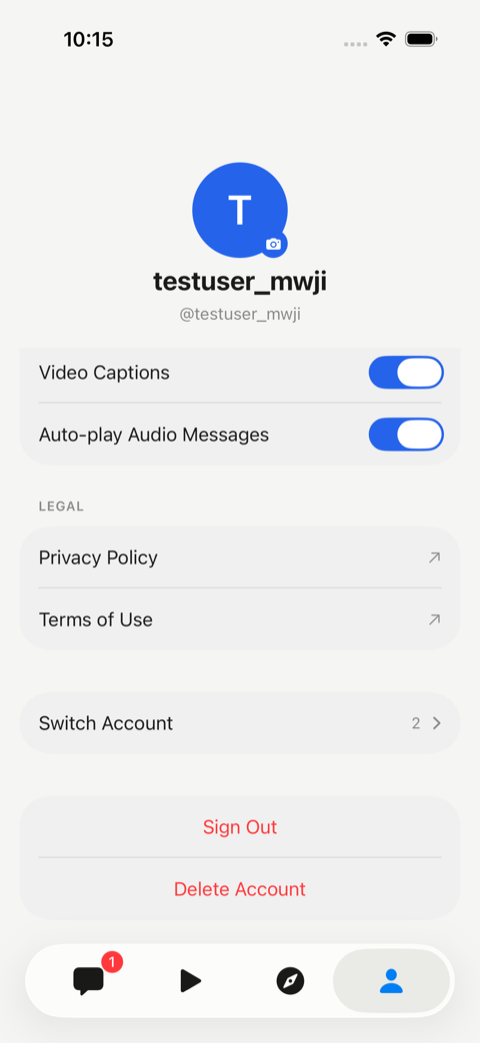
- Scroll to the bottom of the Profile screen, past Legal and Sign Out, until you see the red Delete Account button.
- Tap Delete Account, then tap Delete Account again in the confirmation that slides up from the bottom.
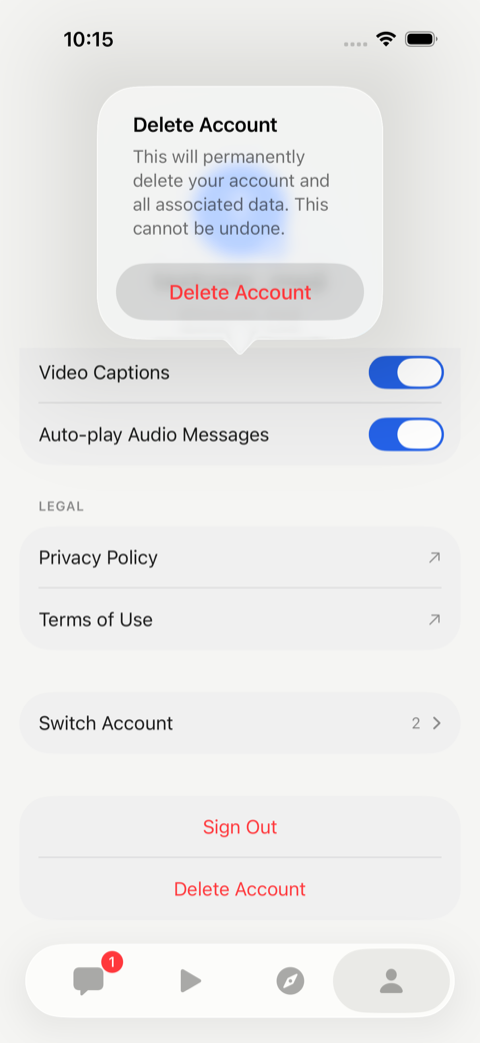
Your account is deleted immediately and the app signs you out. There is no undo, and no waiting period.
If you can't sign in
Almost everyone can — sign-in only needs the phone number you signed up with, and we text you a fresh code. Deleting the app from your phone does not delete your account, so if you still have your number, reinstall Realm and follow the steps above.
If you no longer have access to that phone number, email az@elegancelabs.com and include the phone number your account was registered with. We can't locate an account from an email address alone — every Realm account is identified by phone number, so a request without one can't be actioned and we'll have to write back and ask.
What gets deleted
When your account is deleted, we remove:
- Your profile (name, handle, phone number, email, avatar)
- Your chats, messages, and saved items
- Your preferences, settings, and notification tokens
- Authentication records tied to your account
What we retain, and why
A limited set of records may be retained after deletion where we have a legal or operational obligation to keep them:
- Anti-abuse and fraud records (e.g. flagged phone numbers, abuse signals) — retained to prevent the same actors from re-registering. No personal profile data is kept beyond what is necessary for this purpose.
- Aggregated, de-identified analytics — usage statistics that cannot be linked back to you.
- Records we are legally required to keep (e.g. tax, accounting, or subpoena-related records, where applicable) — kept only for the period required by law.
How long it takes
In-app deletions take effect immediately. Email requests are processed within 30 days, typically much sooner. Backups containing your data are purged on our normal backup rotation, within 90 days of deletion.
Subscriptions
Deleting your Realm account does not automatically cancel a Realm Plus subscription billed by Apple or Google. Cancel it in Settings → Apple Account → Subscriptions on iPhone, or in the Google Play Store → Payments and subscriptions on Android, before you delete your account.
Questions
If you have any questions about deletion or what we store, see our Privacy Policy or email az@elegancelabs.com.